PNC | IR Modernization
- Modernizing Information Reporting by focusing on the Activity workflow—from quick insight to reusable custom reports and consistent exports.
- Redesigned filter clarity + results feedback so users can refine without second-guessing.
- Established a repeatable reporting flow (save → build → run → export) to reduce rework and increase trust.

The user moment
A treasury or operations user needs to answer a question fast—What transactions happened? What changed? What needs attention? In the legacy experience, filtering and exporting felt inconsistent, and users often rebuilt the same views repeatedly. The goal: make Activity reporting feel clear, reusable, and trustworthy from first glance through export.
OVERVIEW
Information Reporting is a high-frequency workflow where speed and trust matter. This case study focuses on modernizing the Activity experience—helping users review transactions quickly, refine results with confidence, reuse saved work, and export audit-ready PDFs without surprises. Discovery is complete and implementation is in progress.
What we modernized
- Activity review (scan-first table + supporting chart)
- Filter clarity (scope, defaults, and “why did this change?” feedback)
- Reuse (favorites + “create report from current view”)
- Export trust (consistent PDF output + predictable link return)
- Why it mattered
- Reporting is a major lever for retention and revenue because it’s how clients prove, share, and audit what happened.
Why it mattered
Reporting is a major lever for retention and revenue because it’s how clients prove, share, and audit what happened.

PROBLEM
- Filters were confusing: users didn’t understand scope, interactions, or why results changed.
- Exports were inconsistent: outputs varied in formatting and predictability, reducing trust.
- Hard to reuse work: users repeated the same configuration steps instead of saving context.
- Dated UI amplified confusion: older patterns and inconsistent presentation made the workflow feel less trustworthy.

WORKFLOW
Discovery focused on the full Activity → Report → Export journey—where users lose confidence and where the system creates inconsistency. We mapped the end-to-end flow cross the Activity experience, Report Builder, report engine, and export service, then translated that map into a future-state workflow and a set of build-ready requirements to standardize filter behavior, reuse, and export outputs across report types.
Users / jobs we optimized for:
- Review recent activity quickly (scan-first results)
- Filter with confidence (clear scope + feedback)
- Reuse configuration (favorites + create report from current view)
- Export for audit / sharing (predictable PDF)
This alignment reduced churn in design reviews and gave engineering a single source of truth for workflow behavior and states.


ROLE / TEAM
As UX Manager for Information Reporting modernization, I:
- Led UX for Activity reporting modernization (filters → reuse → export)
- Partnered with 2 designers to iterate key moments and unify patterns
- Worked with the IR product team to define scope, priorities, and MVP sequencing
- Mapped the end-to-end flow across services and authored requirements for filter behavior, states, and export expectations.
- Partnered with engineering to make “create report from current view” and consistent PDF export buildable.

DISCOVERY / MAPPING
Discovery mapped the Activity-to-export journey end-to-end, including the systems involved (Activity module, report builder, report engine, export service). The output was a future-state workflow and a set of requirements to make filters, reuse, and exports consistent across report types.
Users / jobs we optimized for:
- Review recent activity quickly (scan-first results)
- Filter with confidence (clear scope + feedback)
- Reuse configuration (favorites + create report from current view)
- Export for audit / sharing (predictable PDF)

SOLUTION
We focused the modernization on three outcomes: clarity (filters + feedback), reuse (favorites + report-from-view), and trust (consistent exports).
- Clarified filters: predictable grouping, clear scope, and tighter results feedback loops.
- Designed for reuse: “start from where you are” → launch the Report Builder pre-filled from the current view.
- Standardized exports: consistent PDF generation rules and user-facing output behavior.

Key moments
- Filter clarity: grouping, language, defaults, validation, and clear “results updated” behavior.
- Reuse: favorites + report builder pre-filled from the current view → saved custom report.
- Export trust: predictable PDF formatting (headers/footers), clear scope, and consistent link return.
TESTING
With discovery complete, the next focus is validating that users can understand filters quickly, successfully reuse work, and trust exports without surprises.
Planned validation focus
- Filter comprehension: Can users predict scope and understand why results change?
- Reuse success: Do users find and use favorites / saved reports instead of rebuilding?
- Export expectations: Do outputs match what users believe they’re exporting?
What we’ll measure
- Time to confident results: Activity load → first successful refinement.
- Filter iteration rate: number of edits before “Run Report.”
- Reuse adoption: saved search usage vs. rebuild behavior.
- Export trust signals: reruns, retries, and abandonment after export.
Prototype
Walk through the two primary paths and validate the key moments in context.
- Apply filters via the drawer → confirm chips + count feedback.
- Run Advanced Search → review criteria summary on results.
- Trigger Run Report / Export → confirm scope and output expectations.
IMPLEMENTATION
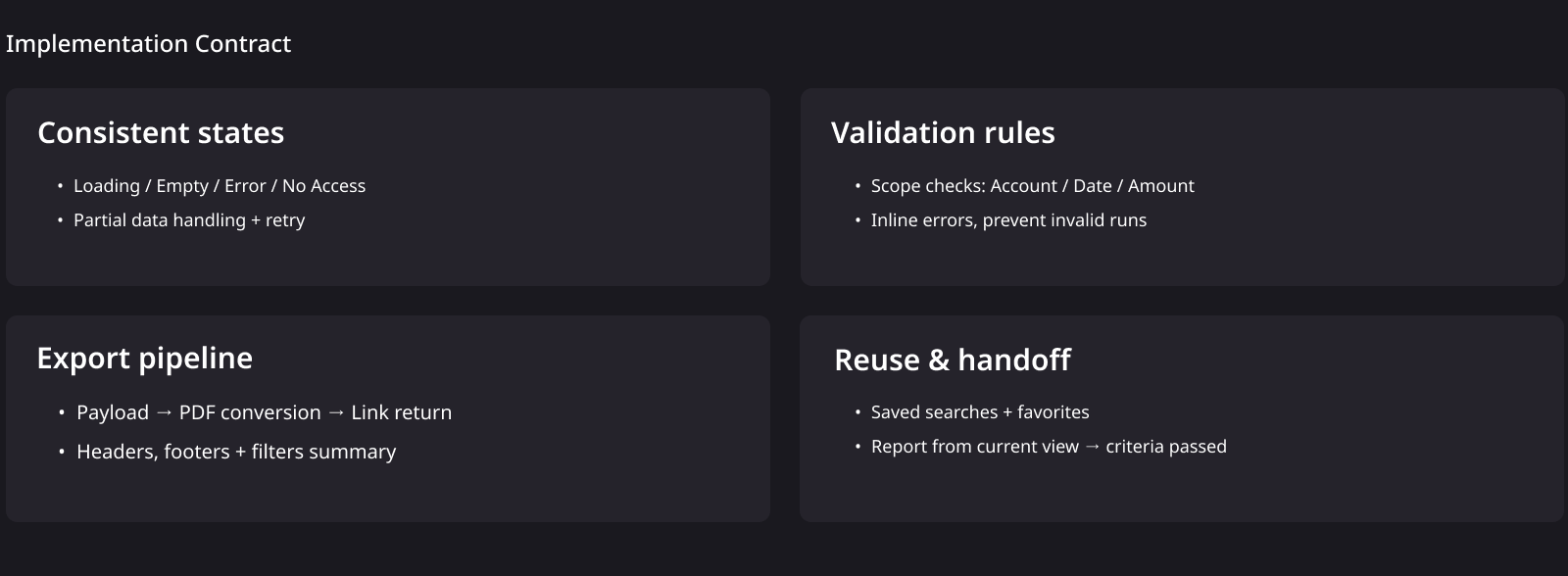
Implementation is in progress. We aligned the front-end workflow and supporting services so the reporting experience stays predictable across the journey—from results to export.
What we aligned across the stack
- Consistent states: loading, empty, error, no access, and partial data handling.
- Validation contract: filter scope and inputs validated before report generation.
- Export pipeline: report payload → PDF conversion → link return with predictable formatting rules.
- Reuse model: favorites + report builder launched from current view context.
The win here is a shared “contract” that keeps UI behavior and downstream outputs consistent—so additional report types can scale into the same model without redesigning states, validation, or export rules each time.
IMPACT
Impact-to-date (in progress): we reduced ambiguity in high-frequency reporting by making the flow repeatable, the filters predictable, and the export behavior consistent.
- Reduced re-learning: a consistent “quick insight → refine → save → run → export” rhythm means users don’t have to remember different rules across entry points.
- Lowered friction: clearer scope, cleaner grouping, and visible results feedback help users refine confidently without second-guessing “what changed and why.”
- Improved trust in outputs: predictable PDF behavior (what’s included, how it formats, and how users return) reduces surprises and supports audit-ready sharing.
- Scalable foundation: shared patterns for states, validation, reuse, and export establish a repeatable model we can extend to additional report types without re-solving the same problems.
How we’ll measure next: fewer filter retries before run, higher reuse of saved searches / favorites, fewer report rebuilds, and higher completion of export without reruns.
REFLECTION
This modernization reinforced that reporting UX is less about “pretty screens” and more about trust: predictable filtering, clear scope, and exports that match user expectations. The next step is validating comprehension and reuse through targeted testing, then scaling the same patterns across additional report types.
What I’d carry forward
- Design the contract, not just the UI: states, scope rules, and output behavior are what make reporting feel dependable.
- Keep users in context: refine in place, show scope clearly, and make it easy to iterate without losing your spot.
Next steps
- Validate filter comprehension + “why did this change?” feedback with targeted tasks.
- Confirm reuse behavior: saved searches / favorites vs. rebuild from scratch.
- Verify export expectations: what’s included, formatting predictability, and link return behavior.